
Brat Generator — Free Charli XCX Text, Font & Meme Maker Online
Brat Generator is a free online tool to create Charli XCX-style text images in seconds — no Photoshop, no signup, no watermark. Type your text, pick a color, download a clean PNG. Used by TikTok creators, Instagram users, and Charli XCX fans worldwide to make brat-style posts, memes, and album covers instantly.
The brat aesthetic — bold Arial Narrow-style font, neon green (#8ACE00) background, soft blur, became a global trend after Charli XCX released the “Brat” album on June 7, 2024 via Atlantic Records.
Our brat generator captures that exact look: tight lowercase lettering, customizable blur from 0–10px, and six signature colors from the album palette.
What Is the Brat Font? (And How This Generator Uses It)
The brat font is Arial Narrow Bold — a condensed, heavy sans-serif that Charli XCX’s design team used for the “Brat” album cover released in 2024. The font is rendered in lowercase, stretched slightly, and printed at low resolution to create that raw, blurry, DIY aesthetic that defines the brat visual identity.
Our brat generator replicates this Arial Narrow Bold style directly in your browser — no font download needed, no installation. The brat font renders instantly as you type, giving you the same tight letter-spacing and compressed weight that made the original cover iconic.
Want to use the actual brat font in other apps? The closest free match is Arial Narrow (weight 700), available in Google Docs, Canva, and Microsoft Word. For the exact brat font download, search “Arial Narrow Bold” in your system fonts and it ships with most Windows and Mac installations.
What makes the brat font recognizable is not just the typeface but the combination: lowercase text, 0–7px Gaussian blur, and a flat color background — particularly brat green (#8ACE00). Our tool locks in this combination automatically, so every output looks authentically brat without any manual adjustment.
What is Brat Generator?
Brat Generator is a free web-based creative tool that lets you generate custom images in the style of Charli XCX’s “Brat” album — the 2024 release that sparked a global aesthetic movement. You type a word or short phrase, choose a background color or upload your own image, apply effects, and download a watermark-free PNG in seconds.
The tool is built for content creators, TikTok users, Instagram posters, and Charli XCX fans who want to create brat-style visuals fast — without design skills, Photoshop, or paid subscriptions. No login required. Works on iPhone, Android, and desktop.
At its core, the brat generator produces images with the signature elements
of the “Brat” aesthetic:
- Arial Narrow-style bold font in lowercase — the exact brat text style
- Brat green background (#8ACE00) or five additional color options
- Blur effect (0–10px) to replicate the album’s soft, hazy look
- Strike lines for that crossed-out, redacted visual grit
- HD PNG download — no watermark, ready for any platform
Unlike basic text overlay tools, our brat text generator gives you real typographic control: adjust font size, letter spacing, line height, and blur simultaneously. The live preview updates instantly — what you see is exactly what you download.
Whether you’re making a brat meme, a playlist cover in the style of “360” or “Von Dutch,” a WhatsApp sticker, or a TikTok thumbnail — this generator handles all of it in one place, free.
Why Charli XCX Fans Use This Generator Daily
Every time Charli XCX releases new music, remixes “360,” teases “Von Dutch” edits, or drops “Club Classics” content, searches for brat generator, charli xcx text generator, and brat font spike globally.
Our tool stays updated with fresh color presets and effects tied to each new release cycle. Fans come back because every Charli moment — a new collaboration, a setlist change, a fan-made lyric clip — becomes a reason to make new brat-style content. The brat lyrics generator feature lets you turn any track line into a shareable image: type “party 4 u,” “so julia,” or “everything is romantic” and watch the brat aesthetic do the rest.
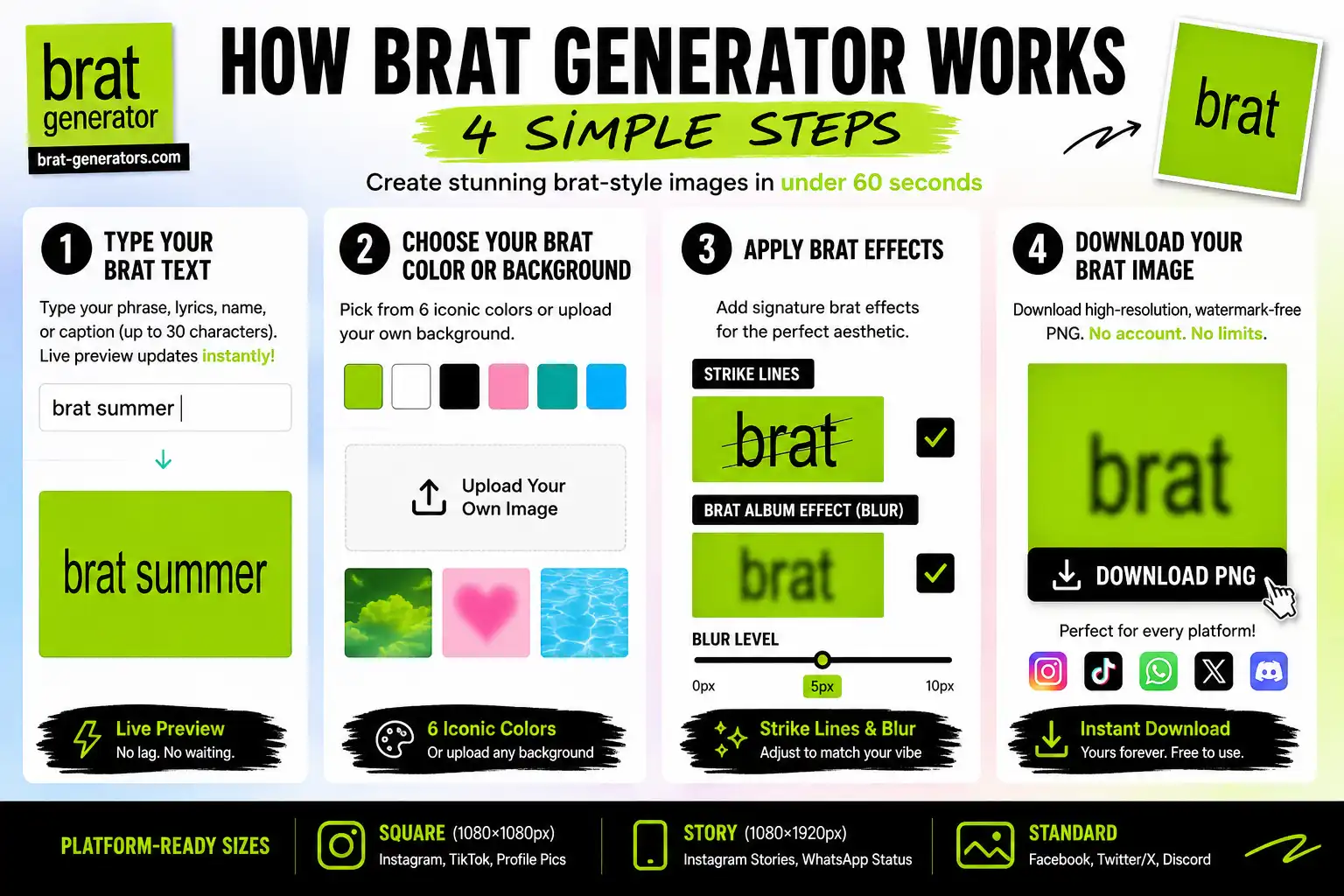
How Brat Generator Works — 4 Simple Steps
Creating your first brat-style image takes under 60 seconds. Here is the exact process:
Step 1 — Type Your Brat Text
Click the text field and type your phrase — song lyrics, your name, a caption, or any short statement. The generator supports up to 30 characters for the tightest brat aesthetic. Charli XCX fan favorites: “360,” “brat summer,” “von dutch,” “so julia,” “club classics,” “everything is romantic,” “party 4 u.”
As you type, the live preview updates instantly in the Arial Narrow bold brat font style — no lag, no waiting.
Step 2 — Choose Your Brat Color or Upload a Background
Select from six album-accurate background colors:
- Brat Green (#8ACE00) — the iconic neon green from the “Brat” album cover
- Crisp White (#FFFFFF) — high-contrast, popular for brat text generator white style
- Bold Black (#000000) — dark mode brat aesthetic
- Soft Pink (#FFB6C1) — brat generator pink, trending for romantic edits
- Deep Teal (#008080) — for editorial and moodboard looks
- Electric Blue (#00BFFF) — Club Classics-era vibes
Or upload your own photo from your phone or computer. The tool auto-fits your image to the canvas. Text color adjusts independently — match it to the background for subtle style, or contrast for maximum impact.
Step 3 — Apply Brat Effects
Two signature effects define the brat visual style:
- Strike Lines — Thin diagonal slashes through the text, mimicking the redacted/crossed-out zine aesthetic popular in Charli XCX fan art. Perfect for “Von Dutch” edits or anything that needs raw energy.
- Brat Album Effect — A full hazy overlay with a radial gradient vignette, replicating the exact blur treatment from the original “Brat” cover. Use blur level 5–7px for the most authentic match.
The blur slider (0–10px) gives you precise control. At 0px: sharp, bold typography. At 5px: the classic brat generator blur look. At 10px: ethereal, dream-like fade.
Step 4 — Download Your Brat Image
Click Download PNG — your image saves instantly as a high-resolution, watermark-free PNG file. No account needed, no export limits.
Platform-ready sizes:
- Square (1080×1080px) — Instagram posts, TikTok thumbnails
- Story (1080×1920px) — Instagram Stories, WhatsApp status
- Standard — Facebook, Twitter/X, Discord profile pictures
Download as many times as you want. Every image is yours — free for personal and commercial use.
Brat Lyrics Generator — Turn Charli XCX Songs Into Shareable Images
The most popular use of our brat lyrics generator is turning Charli XCX song lines into shareable visual content — the kind that fills TikTok comment sections and Instagram Stories after every new release.
Most-used lyrics in our generator:
- “360” — “I think therefore I am” in Arial Narrow on brat green at 5px blur
- “Von Dutch” — with strike lines for maximum attitude
- “Club Classics” — black background, white text, 0px blur — sharp and club-ready
- “So Julia” — soft pink background, 3px blur — the romantic brat aesthetic
- “Party 4 U” — brat green, full album effect
- “Everything Is Romantic” — light blur, teal background
To use as a brat lyric generator: type your chosen lyric (up to 30 characters — keep it punchy like the album’s track titles), pick your color, apply the Brat Album Effect, and download. The result is platform-ready for TikTok, Instagram, Spotify canvas, or WhatsApp status.
Also works as a brat text generator for any custom phrase — you don’t need to use official lyrics. Fans create everything from inside jokes to birthday messages in the brat style.
Brat Generator Features — Colors, Effects & Export Options
Our brat generator goes beyond basic text overlay. Here is what makes it the most feature-complete free tool for creating Charli XCX-style brat text, brat memes, and brat album covers online — with no watermark, no login, and no limits on downloads.
Six signature brat colors sampled directly from the “Brat” album visual palette:
Not sure which fits your vibe? Our Brat Text Generator breaks down the mood and use-case behind each color in detail.
FAQ About Brat Generator
What is the exact brat font name?
The brat font is Arial Narrow Bold — the same condensed sans-serif used on Charli XCX’s “Brat” album cover. It’s available free on most computers. In our generator, we replicate this style automatically so you don’t need to install anything.
What is the brat green color code?
The brat green hex code is #8ACE00 — a bright yellow-green that defines the “Brat” album aesthetic. Our generator uses this as the default background color. For text on brat green, white (#FFFFFF) gives the highest contrast, matching the original album cover.
Can I use this as a brat lyrics generator?
Yes — type any Charli XCX lyric (up to 30 characters) into the text field, select brat green or your preferred background, apply the Brat Album Effect, and download. Popular lyrics: “360,” “von dutch,” “club classics,” “so julia,” “party 4 u.”
What’s the difference between the Brat Generator and the Brat Text Generator?
This page focuses on quick, all-in-one creation — text, colors, and effects in one place. Our Brat Text Generator goes deeper on typography — more font options, precise spacing control, and additional export formats for design work.
Is the Brat Generator really free?
Yes — completely free, no signups, no limits. Download as many images as you want.
Can I use these images commercially — merch, stickers, etc.?
Yes — your creations are yours for personal and commercial use. Just avoid direct copies of official album artwork; the aesthetic itself is fair-use fan culture.
What if my text exceeds 30 characters?
It gets trimmed to fit, keeping the front of your phrase. Shorter text tends to hit harder anyway — that’s part of what makes the brat aesthetic work.
Does it work on my phone?
Yes — fully optimized for iPhone and Android. Sliders, uploads, and previews all work smoothly on mobile.
How do I match the exact album blur?
Set the blur slider to 5–7px for the closest match to the original album cover.
Are there limits on uploads?
Keep files under 5MB, JPG or PNG. The tool resizes automatically to keep things fast.
Can I add emojis or symbols?
Yes — the text field supports Unicode, so emojis and symbols work fine within the 30-character limit.
What file format do downloads come in?
PNG — high-resolution, with a transparent background option for layering in other design tools.
Is this tool official from Charli XCX?
No — we’re fans building this as a tribute to the aesthetic, not an official product.
How do I change the text color to match my background?
Use the color picker next to the text field — set it independently from your background color. The live preview updates instantly so you can check the contrast before downloading.
What’s the best way to use my own uploaded photo?
Pick an image with enough open space for your text to stay readable. If the photo is busy, try the outline or shadow effect to help the text stand out.
Can I adjust the text position on the image?
Yes — you can reposition text on the canvas, whether you want it centered for an album-style look or off-center for a more casual meme feel.
Why limit text to 30 characters — can’t I make it longer?
The cap keeps things punchy, in the spirit of the album’s short track titles. If you need more text, you can create a second image and combine them in any basic editor.
How does the strike-lines effect work?
It adds thin diagonal lines across your text for a crossed-out, redacted look — popular for “Von Dutch”-style edits. Toggle it on and adjust intensity in the preview.
What’s the difference between strike lines and the Brat Album Effect?
Strike lines add diagonal crossed-out marks over the text. The Brat Album Effect applies the full hazy blur and vignette from the original cover. You can combine both for a layered look.
What’s a quick tip for recreating the exact album cover look?
White text on brat green, Brat Album Effect on, blur around 6px, tight letter spacing. That combination matches the original cover most closely
Brat Aesthetic in 2026 — Why the Trend Is Still Going Strong
Brat Summer started as a cultural moment tied to Charli XCX’s June 2024 album release — but the aesthetic has outlasted the season. In 2026, the brat aesthetic continues to define how Gen Z expresses identity on social media: lowercase font, neon green, deliberate blurriness, and unapologetic attitude.
Why the brat trend continues in 2026:
The “Brat” album by Charli XCX via Atlantic Records won 3 Grammy Awards, spawned global remix culture, and became one of the most referenced visual aesthetics in content creation history.
The album’s tracks — “360,” “Von Dutch,” “Club Classics,” “Sympathy Is a Knife,” “So Julia,” and “Brat” itself — remain heavily streamed and referenced, keeping the visual language alive across every new wave of fans
Brat generator searches remain high across Indonesia (the world’s largest brat generator search market), the Philippines, the United States, and Brazil — proving this is not a fading trend but an embedded aesthetic language.
How fans are using the brat generator in 2026:
- Anniversary edits — recreating original brat summer moments from 2024
- New music drops — whenever Charli XCX releases new content, generator usage spikes within hours
- Meme formats — the blurry green text on any topic remains one of social media’s most versatile meme templates
- Brand content — small brands and creators using the brat aesthetic for campaign visuals that feel culturally current
- Playlist covers — Spotify and Apple Music playlist covers in brat style are a consistent use case throughout 2026
Brat Generator Examples — Style Ideas to Try
See what’s possible with a few different combinations, then load the tool above and make it your own.
Sunset fade: Upload a warm background photo, add lime text at 4px blur, no extra effects — gives a soft, faded look that works well for story series.
Strike-lines contrast: White background, black text, strike lines on, blur pushed up to 10px — a high-contrast, slightly ghostly effect that reads well in low light.
Full album effect: Upload a busy background (like a crowd or dance floor shot), electric blue text, Brat Album Effect layered on top — good for high-energy, TikTok-ready visuals.
Quick combinations to try:
- Pink background, strike lines at 2px — soft but edgy, works well for playlist covers
- Brat green background, white text, 6px blur — the closest match to the original album look
- Black background upload, white text, 0px blur — sharp and clean, good for a minimal poster feel
Mix and match colors, blur, and effects until you find your own combination — that’s the whole point of the tool.
See more ideas on our Brat Text Generator, Brat Meme Generator, and Brat Font Generator pages — each optimized for a specific use case.

The Brat Aesthetic — Fonts, Colors & Design Explained
The brat aesthetic is built on deliberate restraint: one dominant color, minimal text, and just enough blur to feel intentionally imperfect. Here is a breakdown of every design element so you can recreate it precisely.
The Brat Font:
Arial Narrow Bold — weight 700, all lowercase, tight letter spacing (-2 to -3px), line height approximately 0.9. This is the closest match to the original “Brat” album typography. The font is widely available and pre-installed on most devices.
The Brat Green Color:
The exact brat green hex code is #8ACE00 — a high-saturation yellow-green that reads as neon on screens. Some sources cite #8ACF00 (one digit off) — both are acceptable. Our generator uses #8ACE00 as the default.
The Blur:
The original “Brat” album cover applies approximately 5–7px of Gaussian blur to the text. This creates the signature soft, slightly-out-of-focus effect. Our blur slider lets you match this exactly: set to 6px for the most authentic result.
The Layout:
Text is center-aligned, filling roughly 60–70% of the canvas width. Lowercase only. No punctuation on the original cover — though fan interpretations use periods, commas, and exclamation marks freely.
Using the brat aesthetic in Canva, Figma, or Photoshop: Download your PNG from our generator — it exports with a transparent background option — and layer it into any design tool. The PNG is 1080×1080px by default, ready for Instagram grid or TikTok thumbnail use.
Explore More Brat Tools
Our brat generator is part of a complete suite of free Charli XCX-style creative tools:
- Brat Text Generator — Advanced typography controls: 6 font options, custom letter spacing, glow, shadow, outline and mirror effects. Best for precision brat text.
- Brat Font Generator — Focused on font style: Arial Narrow, Helvetica Condensed, Impact, Futura. Explains what the brat font is and lets you use it directly.
- Brat Meme Generator — Upload any photo and add brat-style text overlay. Best for custom brat memes.
- Brat Emoji Generator — Create brat-style emoji stickers for WhatsApp, Telegram, and social media.
- Brat Album Cover Generator — Professional 3000×3000px album covers for Spotify, Apple Music, and SoundCloud.
- New to the trend? Find out what ‘brat’ really means — and where it came from
- Need a name before you start designing? Browse brat username ideas first.
Quick Note on Vibes and Rights We’re huge Charli XCX fans crafting this brat generator as a tribute to the “Brat” aesthetic—think fan art, not official gear. Your creations? Yours to share or sell as long as they stay original twists (no straight copies of album art). We don’t claim any ties to Charli or her team; this tool’s all about sparking your own neon chaos. Questions? Hit us up.